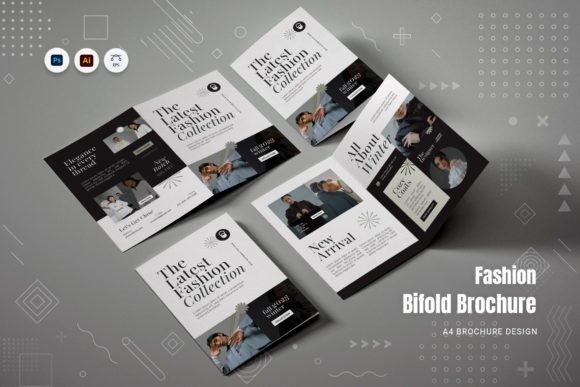
Fashion Bifold Brochure: A Practical Guide to Professional Print Results
In the competitive world of fashion marketing, your collateral often speaks before you do. A Fashion Bifold Brochure is more than just a folded piece of paper; it is a tactile extension of your brand identity. Whether you are a boutique owner launching a new collection, an educator teaching design principles, or a freelancer pitching to potential clients, this format offers a compact yet impactful way to present information. The appeal lies in its versatility. It allows you to share your vision in an informative and creative manner, bridging the gap between digital aesthetics and physical reality. However, simply downloading a template does not guarantee success. Many creators overlook critical technical and design details that can turn a promising project into a costly mistake.
The Hidden Pitfalls of Template Selection
One of the most common misunderstandings among beginners and even some professionals is assuming that all templates are created equal. When searching for a Fashion Bifold Brochure, users often focus solely on the visual mockup without inspecting the underlying file structure. This oversight can lead to significant frustration later. A template might look stunning in a preview image, but if the layers are flattened or disorganized, customizing it becomes a nightmare. You may find yourself struggling to move a single text box because it is locked inside a complex group, or worse, unable to change a color because the swatches are not properly defined.
Another frequent error involves ignoring the technical specifications required for professional printing. Many designers download files that are set up for screen viewing rather than print production. If your file lacks the correct bleed settings, your final printed brochure could have unsightly white edges where the paper was trimmed. Similarly, using RGB color profiles instead of CMYK can result in colors that appear dull or completely different from what you saw on your monitor. These issues affect the perceived quality of your brand, making even high-end fashion lines look amateurish.
Ensuring Print Readiness and File Integrity
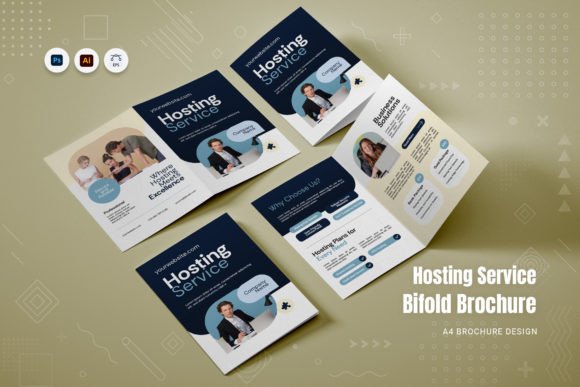
To avoid these pitfalls, you must verify specific technical details before committing to a template. A high-quality Fashion Bifold Brochure should be fully print-ready right out of the box. This means the file size should be A4, utilizing the CMYK color mode at 300 DPI resolution. These standards ensure that images remain crisp and colors reproduce accurately when sent to a professional printer. Additionally, check if the template includes proper bleed margins. Bleed extends the design slightly beyond the trim edge, ensuring no white borders appear after cutting.
Equally important is the organization of the file itself. Look for templates described as "fully layered" and "well organized." In Adobe Illustrator (.ai) or Adobe InDesign (.indd), this means that text, images, and vector elements are separated into logical groups. This structure allows you to modify the mockup's elements anytime without breaking the layout. If the files are messy, you will waste valuable time untangling elements instead of focusing on your content. Always request or review a README file included with the download; this document often contains crucial instructions on how to edit the template safely and which fonts were used.
Common Design Mistakes and How to Correct Them
Even with a technically sound template, poor design choices can undermine your message. A frequent mistake in fashion brochures is overcrowding the layout with too much text or low-resolution imagery. Fashion is inherently visual, and the layout should reflect that. A clean and modern layout prioritizes whitespace, allowing your photographs and typography to breathe. When every inch of the page is filled, the viewer feels overwhelmed, and the key message gets lost.
Typography is another area where many stumble. Using too many different fonts can make a brochure look chaotic. Instead, stick to a limited palette of complementary typefaces. Fortunately, many professional templates come with built-in free fonts that are already paired harmoniously. These fonts are selected to work together, saving you from the guesswork of matching styles. If you decide to replace them, ensure the new fonts support the same character sets and weights to maintain consistency across headings and body text.
Image placeholders are essential tools, but they are often misused. Beginners sometimes insert their own photos without adjusting the aspect ratio or resolution, leading to stretched or pixelated images. Always use high-quality photography that matches the dimensions of the placeholder. If the template uses paragraph styles, take advantage of them to ensure consistent spacing and alignment throughout the document. This attention to detail elevates the presentation and communicates professionalism.
Choosing the Right Software and Workflow
Before purchasing or downloading a template, confirm which software formats are included. The standard for professional print design usually involves Adobe Illustrator (.ai) and Adobe InDesign (.indd). While other programs exist, these two offer the most robust control over vector graphics and multi-page layouts. If you are a beginner, ensure you have access to these applications or compatible alternatives. Attempting to open a complex InDesign file in a basic graphic editor can result in lost formatting and broken links.
Furthermore, consider your workflow efficiency. A template that is super easy to edit saves hours of labor. Look for features like editable text boxes, linked image frames, and scalable vector graphics. This flexibility allows you to adapt the design for different campaigns or educational purposes without starting from scratch. For example, a small business owner might use the same base layout for a seasonal catalog and a one-page flyer, simply by swapping images and updating text.
Evaluating Value Before You Buy
When evaluating a Fashion Bifold Brochure template, price should not be the only factor. Consider the long-term value provided by the included assets. Does the package include a main file in both .ai and .indd formats? Are there separate style guides or instruction manuals? A comprehensive package reduces the learning curve and minimizes errors during production. Conversely, a cheap template that requires extensive manual fixing can end up costing more in terms of your time and potential reprints.
Always test the customization process if possible. Try changing a headline or replacing an image to see how responsive the layout is. A well-constructed template will adjust automatically, maintaining alignment and flow. If you find yourself fighting the software to make simple changes, it is likely not worth the investment. Remember, the goal is to create a stylish web template layout that translates effectively to print, offering a seamless experience from concept to finished product.
By paying attention to these details—file organization, color modes, resolution, and ease of editing—you ensure that your fashion brochure serves its purpose effectively. Whether for marketing a new line or educating students, a well-executed bifold brochure enhances your credibility and engages your audience. Avoid the trap of rushing through the selection process. Take the time to verify the technical specs and design integrity. Your effort in choosing the right foundation will pay off in a polished, professional final product that truly represents your brand.